Stop Guessing.
Start Cutting.
Save Time. Save Material.
CUTLIST.io is a toolbox of shop calculators built for woodworkers. Add up tape measurements, convert inches to millimeters, price a stack of boards, work out a circle glue-up, size Shaker doors and see how many parts fit on a sheet. When it's time to break down plywood, the cutlist optimizer lays out your sheet goods four ways: Rip First, Crosscut First, Max Yield and Smart Stack. Open the tool you need, get your number, get back to the saw.
Seven shop tools, built right in.
Some jobs need a full cutlist. Some just need a number. Every tool here stands on its own, one tap away, and every one is free to try.
Cutlist Optimizer
Cut layouts for plywood and sheet goods, four ways.
Try it free →Unit Converter
Convert measurements between imperial and metric.
Try it free →Tape Measulator
Add, subtract, multiply and divide tape measurements.
Try it free →Board Foot Calculator
Board feet and cost for a list of boards.
Try it free →Quick Fill / Tile
One part filling an area as many times as it can.
Try it free →Circle Glue-Up Calculator
Board lengths for glue-ups that will be circular.
Try it free →Shaker Door Maker
Stile, rail and panel sizes for a cabinet opening.
Try it free →Not your Grandpappy's Cutlist Optimizer.
Four separate engines, one press of Optimize. Pick the layout that matches how you actually break down material.
Rip First
Rip full-length strips first, then crosscut to length. The table-saw workflow: leftover length gets re-ripped into parts, not scrap.
Crosscut First
Cut across the material first, rip it down second. Breaks a full sheet into bands you can actually handle, and every cut runs edge to edge.
Max Yield
No opinion on workflow, just the tightest fit the geometry allows: most parts, fewest sheets. Made for the CNC, where cut order doesn't matter.
Smart Stack
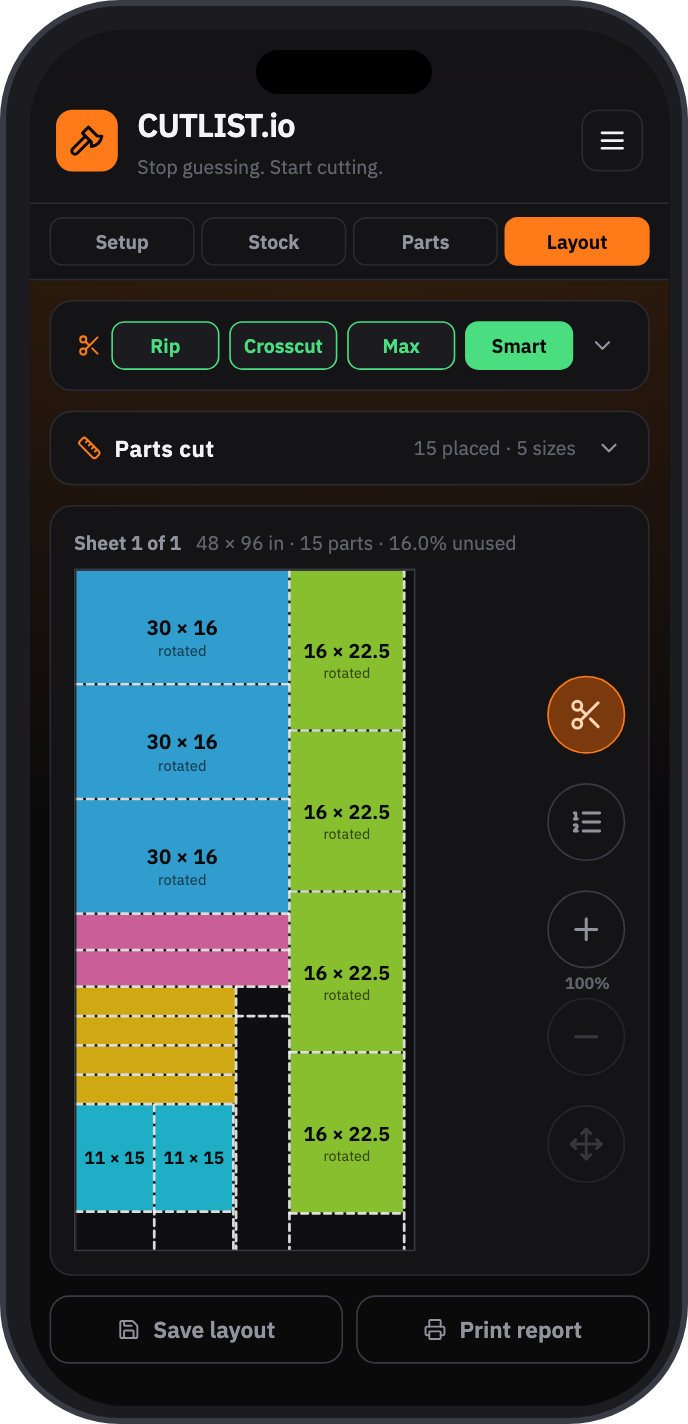
Blends the others, region by region. Dense layouts that still come apart with straight, edge-to-edge cuts on a saw. Tap I'm feeling lucky for a new layout.

The details that make a layout usable, not just pretty.
Type a size, tap add. No spreadsheet, no CSV upload, no fighting a grid of cells.
Blade width, accounted for everywhere. Enter it once — decimal or fraction — and every gap in every layout respects it.
Enter it your way. See it drawn true. Inches or mm, fractions or decimals. We got you covered.
Multiple stock sizes, auto-add when needed. Mix sizes, or let the app keep adding stock until every part is placed.
Optional 90° rotation. Off means your grain direction is respected. On means the engines can turn a part when it helps.
Print a cut report right from the app and take it to the saw. Save your cutlist for later and access it from any of your devices.
“As a woodworker, this is one of the most handy apps for the workshop! Since it came out, four new tools have already been added and more are coming. Highly recommended.”
“I've always been a lil bad at math (and dyslexic) so having a helpful tool to keep me honest (or completely do the work for me) is a no brainer! Helps that it's affordable too 🤘🏼”
See every cut before you make one.
Try it Free!Plan your next sheet on your own parts list. No account needed.
One plan. Every tool.
- ✓ The cutlist optimizer with all four engines, unlimited layouts
- ✓ Unit Converter, Tape Measulator, Board Foot, Quick Fill, Circle Glue-Up & Shaker Door Maker, unlimited
- ✓ Unlimited saved projects
- ✓ Access from any device
- ✓ Print shop-ready cutlists
Before you start
Is there a free trial?
Yes — no account needed. You get 5 free optimizations on your own parts list, and 5 free uses of each calculator, before we ask you to sign up.
Do I need a cutlist to use the calculators?
No. Each tool stands on its own. Open the one you need and skip the rest.
What's the difference between the four engines?
Rip First is the table-saw workflow: rip full-length strips first, then crosscut each strip to length, re-ripping leftover length instead of leaving it as scrap. Crosscut First flips that: crosscut the sheet into bands, then rip parts out of each band, with every cut running edge to edge. Max Yield ignores cut order and packs parts as tight as the geometry allows, which suits a CNC. Smart Stack blends the three region by region and still gives you straight, edge-to-edge guillotine cuts you can make on a saw. Press it again for a different arrangement.
Do I need to fill out a spreadsheet?
No spreadsheet, no CSV upload. Type a width, height, and quantity, tap add — done. Enter the same size twice and it just bumps the quantity instead of cluttering your list.
Do I need a college degree to use this app?
Nope. Built by woodworkers, for woodworkers, with no bloated toolbars or settings you'll never touch. Enter your stock, enter your parts, get a layout.
What happens if a part won't fit?
The app tells you which part, and whether turning on auto-rotate or adding stock would fix it — it never just fails silently.
What devices does it work on?
Desktop, tablet, or phone — whatever's open when you need it. On your phone, add it to your home screen and it opens full-screen like a native app.
How do I cancel?
Anytime, from the Manage Subscription link in the menu — no calls or emails needed. Canceling just stops next year's renewal; you keep full, unlimited access for the rest of the year you already paid for.